Searching several eBay marketplaces at once can uncover listings you would otherwise miss, but a broad worldwide search may also return thousands of results. Global eBay Search now helps you narrow those results using the item specifics supplied by each eBay marketplace.
After your first search, you can filter listings by relevant details such as storage capacity, model, brand, connectivity, screen size, style, and other product-specific attributes. The available choices depend on the search, category, and selected eBay sites, so you see filters that relate to the listings eBay actually returned.
A button will appear at the bottom of the left side bar after a search is executed.
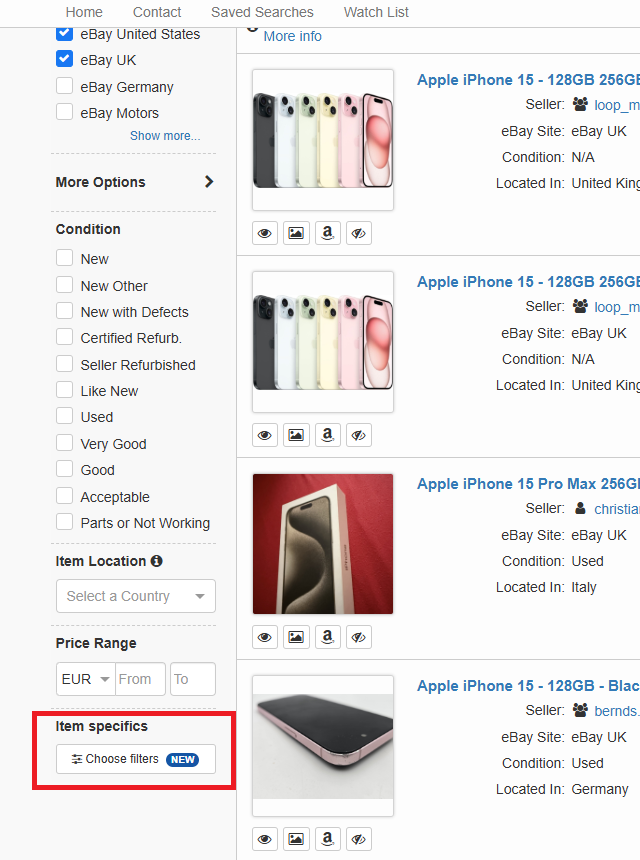
How item-specific filters work across eBay sites
Each selected marketplace can return a different set of item specifics. Global eBay Search organizes them into two practical sections:
- Shared across marketplaces: An item-specific value appears here when the same value, under the same category and aspect name, is returned by more than one searched marketplace.
- Marketplace-only filters: Values returned by just one marketplace appear in a section such as eBay UK only or eBay United States only.
“Shared” does not necessarily mean that an option is available on every selected eBay site. It means that it is available on at least two of the marketplaces included in the current search. When you select it, the filter is sent only to the applicable marketplaces.
This keeps useful common choices together while preserving filters that are unique to an individual eBay site.
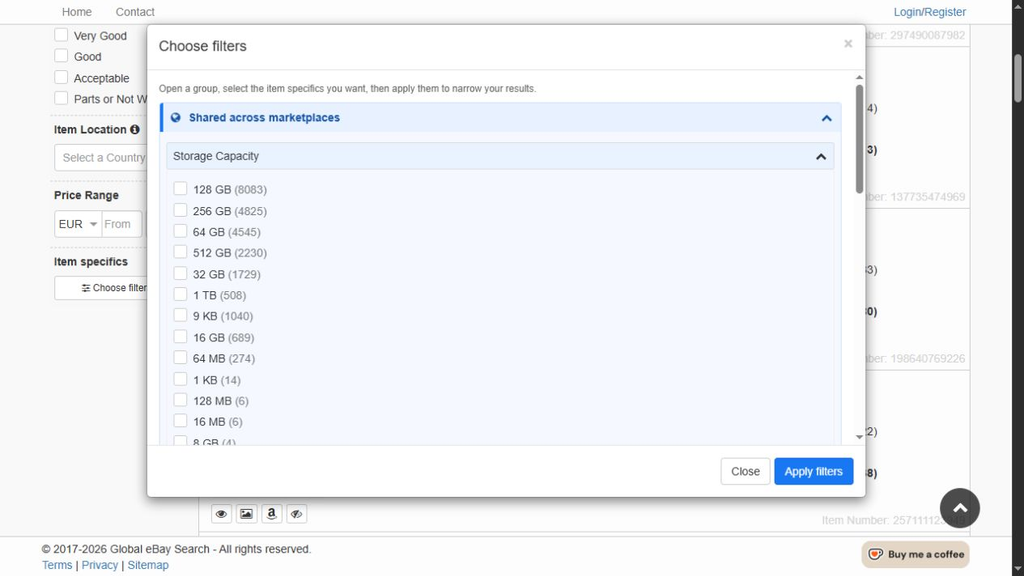
Example: Storage Capacity values shared by eBay UK and eBay United States for an iPhone 15 search. Counts change as listings change.
What the numbers beside each option mean
Each item-specific value includes the match count reported in eBay’s refinement data. For a shared value, Global eBay Search adds together the counts returned by the applicable marketplaces.
Treat these figures as a useful guide rather than a guaranteed final result total. Listings can change between searches, and the combined results page may also handle duplicate, hidden, or otherwise excluded items differently from eBay’s refinement count.
How to filter eBay results by item specifics
- Go to Global eBay Search and select the eBay sites you want to search.
- Enter a search term and run the search. Item-specific filters appear only after a search because they are generated from the refinement information returned by eBay.
- Find Item specifics in the filters sidebar and select Choose filters. A New notice highlights the feature the first time you encounter it.
- Open Shared across marketplaces or one of the marketplace-only sections.
- Expand a group such as Storage Capacity, Brand, Model, or Features.
- Select one or more values. You can combine values from multiple groups and, where available, mix shared and marketplace-specific choices.
- Select Apply filters. Global eBay Search reruns the search and sends each marketplace only the item-specific filters that apply to it.
Your active selections then appear as filter chips in the sidebar.
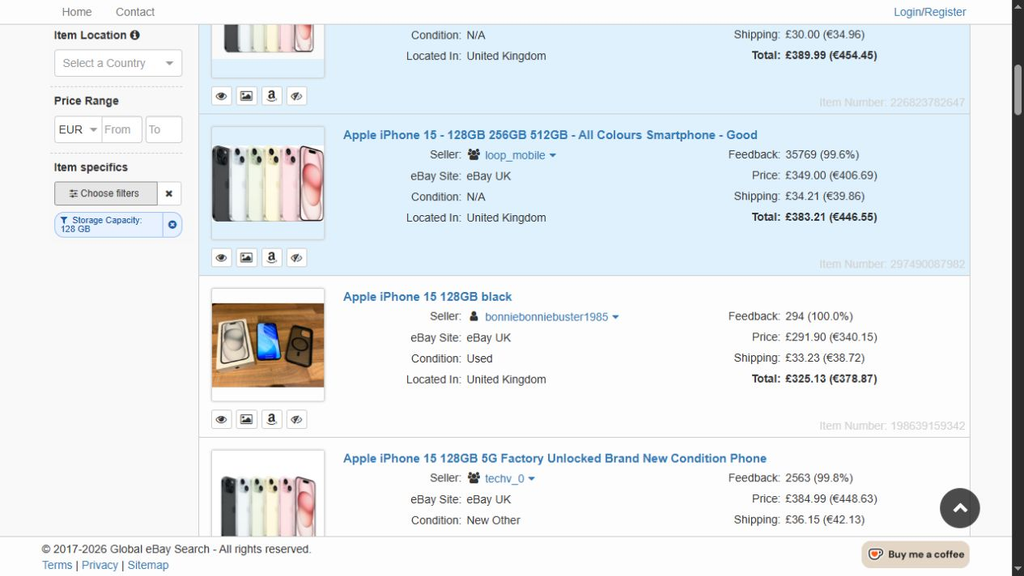
An applied Storage Capacity filter remains visible beside the refreshed results.
Removing or clearing filters
There are three ways to adjust your selections:
- Reopen Choose filters, change the selected values, and select Apply filters again.
- Remove one filter using the small remove button on its chip, then select Apply changes to refresh the results.
- Use the clear button beside Choose filters to remove all item-specific selections. When a search is already active, clearing all selections refreshes the results automatically.
Closing the filter window does not run a new search. Use Apply filters when you want your latest choices to affect the results.
Share or bookmark a filtered search
Applied item-specific selections are stored in the search URL along with the other search settings. This means reloading or bookmarking the URL restores the selected values and applies them to the relevant marketplaces.
It also makes it possible to share a refined cross-marketplace eBay search without asking someone else to recreate every filter manually.
Because item specifics depend on the underlying search, Global eBay Search clears them when you change the search term, selected category, or set of eBay marketplaces and run a new search. You can then choose from the refinements returned for the new search.
Using item specifics with saved searches
Item-specific selections also work with Global eBay Search’s saved-search feature.
Apply the filters you want, then select Save Search. The underlying search request for each marketplace includes the applicable item-specific filters, so scheduled saved-search runs continue to use them. When you execute the saved search from your account, its per-marketplace filters are restored in the search URL.
If you edit and overwrite a saved search, the currently applied criteria become the new saved configuration.
At launch, the saved-search confirmation page may not show item specifics as a separate summary row. They are still retained in the saved marketplace requests.
Availability and other limitations
A few details are worth keeping in mind:
- Item-specific filters appear only when eBay returns usable aspect-refinement data for the search.
- If no usable refinements are returned for a marketplace, it is marked no filters available for that search.
- Marketplace categories and localized item-specific names can differ. Similar concepts may therefore appear in separate marketplace sections instead of the shared section.
- Item-specific selections are tied to the dominant category reported by eBay. Applying one also narrows the applicable marketplace request to that category.
- eBay accepts one category for this type of filter per marketplace. Selecting a value tied to a different category can replace incompatible selections for the same marketplace.
- Available choices and their counts are snapshots of current eBay listings and may change when the search is refreshed.
Refine your next worldwide eBay search
Item-specific filtering makes it easier to begin with a broad search across multiple eBay sites and then focus on the product details that matter to you.
Try a search on Global eBay Search, open Item specifics, and compare the shared and marketplace-only options returned for your item.
No responses yet