Sellers often describe similar items using different words, spellings or model names. The new Boolean Search Builder helps you cover these variations while excluding listings you do not want.
You enter the details using simple fields, and the builder creates the search term for you.
What can you add?
The builder supports four types of search criteria:
- Required words: Every word should be included.
Example: Apple iPhone 17 - Exact phrases: Keeps several words together.
Example: “Nintendo Switch” - OR alternatives: Accepts any term in a group.
Example: (OLED,LITE) - Excluded terms: Removes unwanted words or phrases.
Example: -refurbished or -“parts only”
You can add more than one alternative group when your search needs different sets of options.
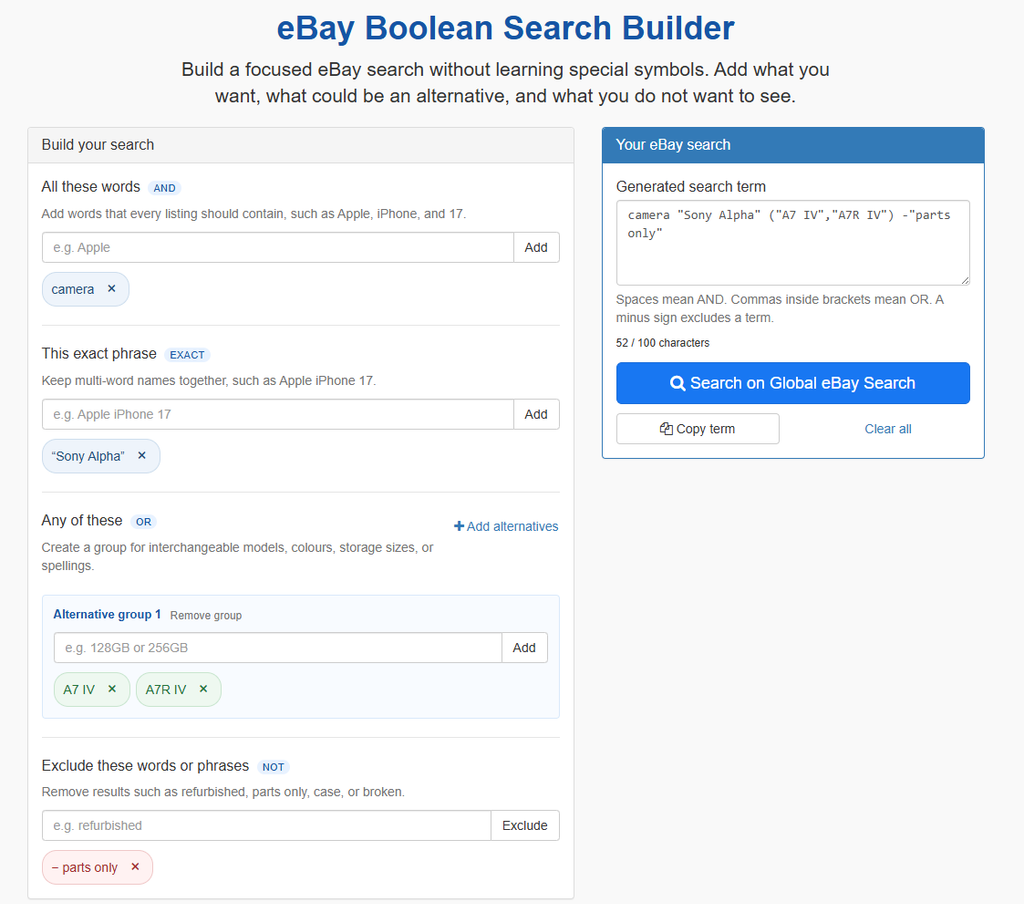
How to build a search
- Select Build an advanced search term beneath the main Global eBay Search box.
- Add words that should appear in every result.
- Add an exact phrase if a product name or description must stay together.
- Group interchangeable models, sizes, colours or spellings under Any of these.
- Add words or phrases you want to exclude.
- Review the generated search term.
- Select Copy term or Search on Global eBay Search.
If you already entered a term in the main search box, the builder carries it over and interprets it where possible.
Example
Suppose you want a Sony Alpha camera, would accept either an A7 IV or A7R IV, and want to exclude parts-only listings.
The builder generates:
camera "Sony Alpha" ("A7 IV","A7R IV") -"parts only"This requires camera and the exact phrase Sony Alpha, accepts either model, and excludes the phrase parts only.
Other examples include:
Apple iPhone 17 -refurbished
camera (digital,mirrorless) -broken
"Nintendo Switch" (OLED,LITE) -case
Live preview and validation
The generated preview updates whenever you add or remove a term. You can also edit it directly, and valid changes are reflected in the guided fields.
The builder checks for unsupported or incomplete syntax, duplicate terms, include-and-exclude conflicts and wildcard characters. Copy and Search remain disabled until the term is valid.
A character counter helps keep the complete search within eBay’s 100-character limit.
Build your search
Open the eBay Boolean Search Builder, add the details that matter, and copy or run the completed search with Global eBay Search.
One response
[…] For detailed instructions and examples, read Build Better eBay Searches with the Boolean Search Builder. […]