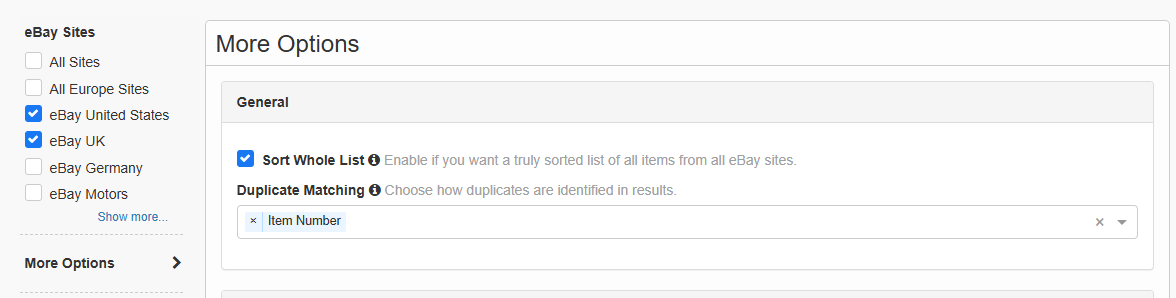
Struggling with duplicate listings in your search results? The new Duplicate Matching feature helps you remove duplicate eBay listings, reduce clutter, and find unique items faster.
Find it under: More Options → General → Duplicate Matching
Options:
- Item Number (default)
- Item Title
- Seller Name
What Duplicate Matching Does
Duplicate Matching lets you control how duplicate listings are detected. The system compares results using your selected field(s) and filters or groups duplicates automatically.
Use it to:
- Remove duplicate search results
- Compare unique listings only
- Improve global eBay search accuracy
Duplicate Matching Options
• Item Number (Default)
- Exact match by item number
- Best way to remove identical listings across eBay regions
- Highest accuracy
• Item Title
- Exact match by title
- Groups listings with identical names
- Useful for finding the same product listed multiple times
• Seller Name
- Matches listings from the same seller
- Helps reduce duplicate listings from bulk sellers
Why Use Duplicate Matching
- Remove duplicate eBay listings instantly
- Clean up search results for faster browsing
- Find unique deals without repetition
- Improve product comparison across countries
Best Use Cases
| Goal | Setting |
|---|---|
| Remove exact duplicate listings | Item Number |
| Group identical product listings | Item Title |
| Filter repeated sellers | Seller Name |
How to Remove Duplicate Listings
- Run your search
- Open More Options
- Go to General
- Find Duplicate Matching
- Choose one or more options
- Apply filters to clean results
Tips for Better Results
- Use Item Number for the most accurate duplicate removal
- Use Item Title to group identical product listings
- Combine options to refine eBay search results
Summary
Duplicate Matching is the easiest way to remove duplicate listings and improve eBay search results. Choose how duplicates are detected and get cleaner, more relevant results in seconds.
No responses yet